
131 lines
4.0 KiB
Markdown
131 lines
4.0 KiB
Markdown
[](https://github.com/google/schema-dts/actions/workflows/ci.yml)
|
|
[](https://coveralls.io/github/google/schema-dts?branch=main)
|
|
[](https://www.npmjs.com/package/schema-dts)
|
|
|
|
# schema-dts
|
|
|
|
JSON-LD TypeScript types for Schema.org vocabulary.
|
|
|
|
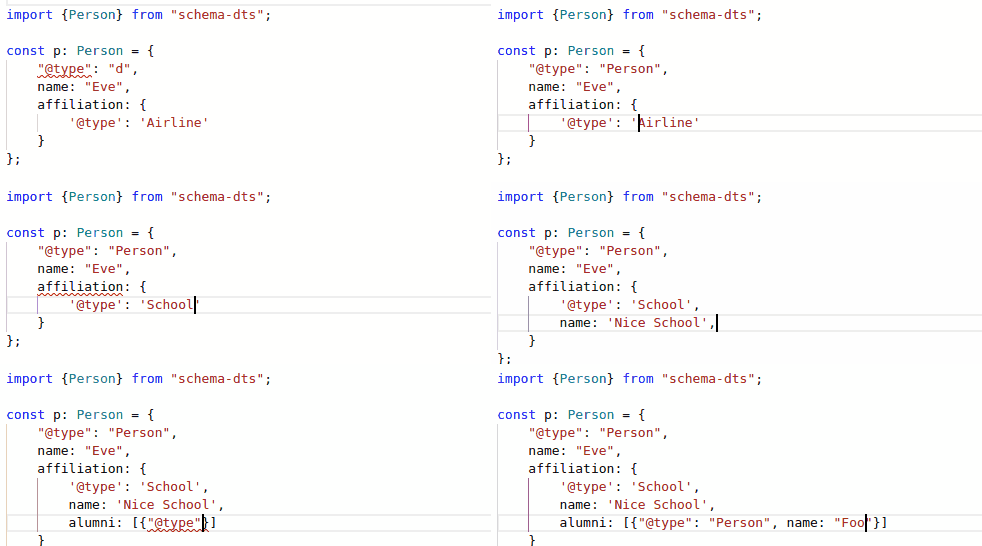
**schema-dts** provides TypeScript definitions for
|
|
[Schema.org](https://schema.org/) vocabulary in JSON-LD format. The typings are
|
|
exposed as complete sets of discriminated type unions, allowing for easy
|
|
completions and stricter validation.
|
|
|
|
|
|
|
|
Note: This is not an officially supported Google product.
|
|
|
|
## Usage
|
|
|
|
To use the typings for your project, simply add the `schema-dts` NPM package to
|
|
your project:
|
|
|
|
```command
|
|
npm install schema-dts
|
|
```
|
|
|
|
Then you can use it by importing `"schema-dts"`.
|
|
|
|
## Examples
|
|
|
|
### Defining Simple Properties
|
|
|
|
```ts
|
|
import type {Person} from 'schema-dts';
|
|
|
|
const inventor: Person = {
|
|
'@type': 'Person',
|
|
name: 'Grace Hopper',
|
|
disambiguatingDescription: 'American computer scientist',
|
|
birthDate: '1906-12-09',
|
|
deathDate: '1992-01-01',
|
|
awards: [
|
|
'Presidential Medal of Freedom',
|
|
'National Medal of Technology and Innovation',
|
|
'IEEE Emanuel R. Piore Award',
|
|
],
|
|
};
|
|
```
|
|
|
|
### Using 'Context'
|
|
|
|
JSON-LD requires a `"@context"` property to be set on the top-level JSON object,
|
|
to describe the URIs represeting the types and properties being referenced.
|
|
schema-dts provides the `WithContext<T>` type to facilitate this.
|
|
|
|
```ts
|
|
import type {Organization, Thing, WithContext} from 'schema-dts';
|
|
|
|
export function JsonLd<T extends Thing>(json: WithContext<T>): string {
|
|
return `<script type="application/ld+json">
|
|
${JSON.stringify(json)}
|
|
</script>`;
|
|
}
|
|
|
|
export const MY_ORG = JsonLd<Organization>({
|
|
'@context': 'https://schema.org',
|
|
'@type': 'Corporation',
|
|
name: 'Google LLC',
|
|
});
|
|
```
|
|
|
|
### Graphs and IDs
|
|
|
|
JSON-LD supports `'@graph'` objects that have richer interconnected links
|
|
between the nodes. You can do that easily in `schema-dts` by using the `Graph`
|
|
type.
|
|
|
|
Notice that any node can have an `@id` when defining it. And you can reference
|
|
the same node from different places by simply using an ID stub, for example
|
|
`{ '@id': 'https://my.site/about/#page }` below is an ID stub.
|
|
|
|
The example below shows potential JSON-LD for an About page. It includes
|
|
definitions of Alyssa P. Hacker (the author & subject of the page), the specific
|
|
page in this URL, and the website it belongs to. Some objects are still defined
|
|
as inline nested objects (e.g. Occupation), since they are only referenced by
|
|
their parent. Other objects are defined at the top-level with an `@id`, because
|
|
multiple nodes refer to them.
|
|
|
|
```ts
|
|
import type {Graph} from 'schema-dts';
|
|
|
|
const graph: Graph = {
|
|
'@context': 'https://schema.org',
|
|
'@graph': [
|
|
{
|
|
'@type': 'Person',
|
|
'@id': 'https://my.site/#alyssa',
|
|
name: 'Alyssa P. Hacker',
|
|
hasOccupation: {
|
|
'@type': 'Occupation',
|
|
name: 'LISP Hacker',
|
|
qualifications: 'Knows LISP',
|
|
},
|
|
mainEntityOfPage: {'@id': 'https://my.site/about/#page'},
|
|
subjectOf: {'@id': 'https://my.site/about/#page'},
|
|
},
|
|
{
|
|
'@type': 'AboutPage',
|
|
'@id': 'https://my.site/#site',
|
|
url: 'https://my.site',
|
|
name: "Alyssa P. Hacker's Website",
|
|
inLanguage: 'en-US',
|
|
description: 'The personal website of LISP legend Alyssa P. Hacker',
|
|
mainEntity: {'@id': 'https://my.site/#alyssa'},
|
|
},
|
|
{
|
|
'@type': 'WebPage',
|
|
'@id': 'https://my.site/about/#page',
|
|
url: 'https://my.site/about/',
|
|
name: "About | Alyssa P. Hacker's Website",
|
|
inLanguage: 'en-US',
|
|
isPartOf: {
|
|
'@id': 'https://my.site/#site',
|
|
},
|
|
about: {'@id': 'https://my.site/#alyssa'},
|
|
mainEntity: {'@id': 'https://my.site/#alyssa'},
|
|
},
|
|
],
|
|
};
|
|
```
|